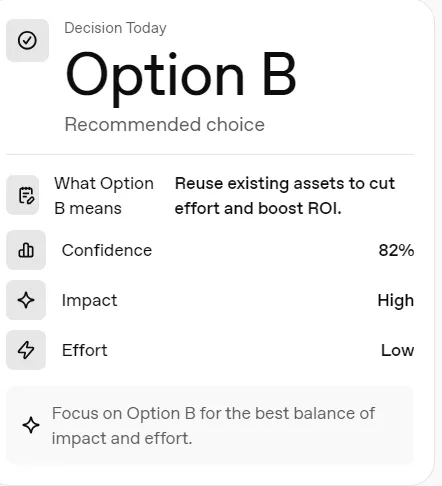
Decision Snapshot Widget (Json + Prompt)
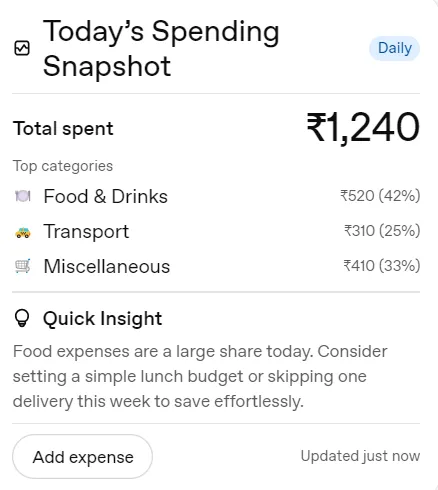
A compact widget that shows a clear daily snapshot with key metrics and one simple insight — designed for quick awareness without dashboards or apps.
The Decision Snapshot Widget helps users quickly summarize a decision and see a clear recommended option, supported by confidence, impact, effort, and a short insight — all in a compact, card-style layout. It is designed for small, frequent decisions, not long analyses.
This widget is built for fast consumption, not deep analysis.
Key Features
- Clean card-based UI
- One-glance readability
- Adjustable layout density
- Works across chat, dashboard, and mobile surfaces
Customization
You can customize:
- Time range (daily or weekly)
- Primary metric label and value
- Number of items shown
- Surface type (chat, dashboard, mobile)
- Layout density (compact or regular)
- Insight text
Customization can be done via:
- Widget editor fields
- Included AI prompts (optional)
What’s Included
- Importable widget file (.json)
- Reusable prompts for regeneration or customization
- Quick-start documentation
This widget is best suited for:
- Choosing between 2–3 predefined options
- Reviewing a single decision at a time
- Displaying a recommendation with rationale, not raw data
Examples:
- Option A vs Option B
- Build vs Buy
- Proceed vs Pause
- Shortlist choice in a workflow
Who This Is For
- Individuals building personal dashboards
- Creators embedding widgets into AI assistants
- Teams prototyping lightweight insight tools
Where This Widget Can Be Used
- AI chat interfaces
- Personal dashboards
- Internal decision tools
- Notion-style embedded views
- Custom GPT or agent UIs
A compact widget that shows a clear daily snapshot with key metrics and one simple insight — designed for quick awareness without dashboards or apps.
The Decision Snapshot Widget helps users quickly summarize a decision and see a clear recommended option, supported by confidence, impact, effort, and a short insight — all in a compact, card-style layout. It is designed for small, frequent decisions, not long analyses.
This widget is built for fast consumption, not deep analysis.
Key Features
- Clean card-based UI
- One-glance readability
- Adjustable layout density
- Works across chat, dashboard, and mobile surfaces
Customization
You can customize:
- Time range (daily or weekly)
- Primary metric label and value
- Number of items shown
- Surface type (chat, dashboard, mobile)
- Layout density (compact or regular)
- Insight text
Customization can be done via:
- Widget editor fields
- Included AI prompts (optional)
What’s Included
- Importable widget file (.json)
- Reusable prompts for regeneration or customization
- Quick-start documentation
This widget is best suited for:
- Choosing between 2–3 predefined options
- Reviewing a single decision at a time
- Displaying a recommendation with rationale, not raw data
Examples:
- Option A vs Option B
- Build vs Buy
- Proceed vs Pause
- Shortlist choice in a workflow
Who This Is For
- Individuals building personal dashboards
- Creators embedding widgets into AI assistants
- Teams prototyping lightweight insight tools
Where This Widget Can Be Used
- AI chat interfaces
- Personal dashboards
- Internal decision tools
- Notion-style embedded views
- Custom GPT or agent UIs
Description
A compact widget that shows a clear daily snapshot with key metrics and one simple insight — designed for quick awareness without dashboards or apps.
The Decision Snapshot Widget helps users quickly summarize a decision and see a clear recommended option, supported by confidence, impact, effort, and a short insight — all in a compact, card-style layout. It is designed for small, frequent decisions, not long analyses.
This widget is built for fast consumption, not deep analysis.
Key Features
- Clean card-based UI
- One-glance readability
- Adjustable layout density
- Works across chat, dashboard, and mobile surfaces
Customization
You can customize:
- Time range (daily or weekly)
- Primary metric label and value
- Number of items shown
- Surface type (chat, dashboard, mobile)
- Layout density (compact or regular)
- Insight text
Customization can be done via:
- Widget editor fields
- Included AI prompts (optional)
What’s Included
- Importable widget file (.json)
- Reusable prompts for regeneration or customization
- Quick-start documentation
This widget is best suited for:
- Choosing between 2–3 predefined options
- Reviewing a single decision at a time
- Displaying a recommendation with rationale, not raw data
Examples:
- Option A vs Option B
- Build vs Buy
- Proceed vs Pause
- Shortlist choice in a workflow
Who This Is For
- Individuals building personal dashboards
- Creators embedding widgets into AI assistants
- Teams prototyping lightweight insight tools
Where This Widget Can Be Used
- AI chat interfaces
- Personal dashboards
- Internal decision tools
- Notion-style embedded views
- Custom GPT or agent UIs